
MX Record Checker to Boost Email Deliverability
MX checker tool
Free Email Spam Test:
Does your DNS have issues in configuration?
Enter your domain name below and see test results:
MailGenius users test over 1M emails per year! By using our Email Tester, you will agree to our Privacy Policy and Terms of Service. The sending email address will receive emails from MailGenius. All tests are hosted on public links.


What Is MX & Why Is It Important?
You spend time crafting the perfect email and building a strong sender reputation, but none of it matters if your messages can’t reach the right mail server.
You need properly configured Mail Exchange (MX) records. MX records tell receiving mail servers where to deliver emails sent to your domain, ensuring your messages are routed to the correct inbox provider. When someone sends an email to your domain, the MX record points that message toward the server responsible for receiving it. Think of it as the postal address for your email.
But MX records aren’t just about receiving messages. They’re an essential part of your domain’s email infrastructure and work alongside authentication protocols like SPF, DKIM & DMARC. If those are your foundation for trusted sending, MX records help make sure your domain can properly receive email in return.
Setting them up correctly isn’t always simple, which is why using an MX checker can save you headaches while helping identify missing, incorrect, or misconfigured records. As email infrastructure is constantly evolving, reliable MX records help keep your domain connected, accessible, and ready to receive messages.
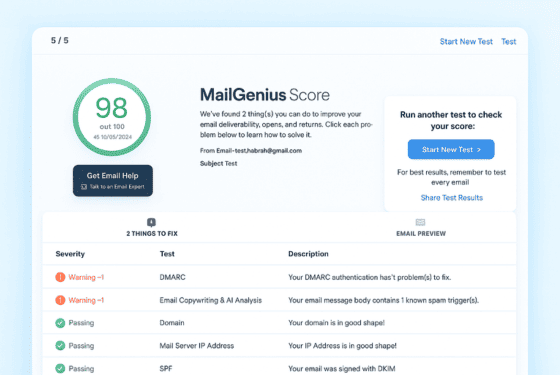

What Is MX?
MX, or Mail Exchange, records are DNS records that tell mail servers where emails sent to your domain should be delivered. For example, when someone sends an email to [email protected], the sending mail server checks your domain’s MX records to find the mail server responsible for receiving that message.
Instead of emails being sent to an unknown destination, MX records provide a clear routing path that directs incoming messages to the correct mail server. Without properly configured MX records, other mail servers may not know where to deliver messages, which can result in bounced or undelivered emails.
MX records typically point to the hostname of your email provider’s receiving mail server and can include priority values when multiple servers are configured. Tools like an MX checker make it easy to verify these records, identify configuration issues, and confirm that your domain is properly set up to receive email.
Why MX Matters
Email depends on more than simply having a domain. If your MX records aren’t configured correctly, incoming messages may have nowhere to go. MX records provide the routing information mail servers need to deliver emails to the right destination.
Why does it matter? Because reliable email communication depends on proper mail routing. When your domain has valid MX records, sending mail servers can identify where to deliver messages, reducing the risk of bounced, delayed, or undelivered emails.
When customers, partners, or subscribers can reliably reach your domain, you avoid missed messages and maintain a dependable communication channel. MX records bridge that gap by connecting your domain to the mail servers responsible for receiving your email.
Without MX records, other mail servers may not know where to deliver messages sent to your domain. With properly configured MX records, your domain has a clear and reliable path for receiving email, helping keep your communication accessible and dependable.


Who MX Is For
MX records aren’t just for enterprise companies with complex email infrastructure. They’re for any business that relies on email to receive messages, communicate with customers, or maintain a reliable email presence.
E-commerce brands benefit by ensuring customer inquiries, order updates, and support emails reach the right mail servers.
SaaS and B2B companies use MX records to reliably receive messages from clients, prospects, and business partners.
Financial services and healthcare organizations rely on properly configured MX records to maintain dependable email communication where timely delivery is essential.
Startups and growth-stage businesses use MX records to establish reliable email infrastructure as their teams, customers, and communication needs grow.
If you rely on email for sales, customer support, or business communication, properly configured MX records are essential for making sure messages sent to your domain can reach their intended destination.
How MailGenius Delivers This Service
Checking MX records requires more than simply looking up a domain. You need accurate DNS checks, proper mail server validation, priority verification, and clear monitoring to ensure everything is configured and working as intended.
MailGenius helps with MX setup & monitoring through our free email testing software designed for marketers, not just developers. Here’s how:
Comprehensive Checks
We check your domain’s MX records and verify that they point to valid, responsive mail servers. We also check for common configuration issues that could affect email delivery.
Mail Server Verification
Our tools verify that your MX records resolve correctly and that the listed mail servers are properly configured to receive email for your domain.
DNS Record Validation
We help verify the necessary MX records in your domain’s DNS and check that their priority values are configured correctly when multiple mail servers are used.
MX Checker Validation
Using our tools, we confirm that your MX setup passes inspection and is ready to properly route incoming messages to your mail servers.
Ongoing Monitoring
MX records aren’t “set it and forget it.” MailGenius helps monitor your email infrastructure so you can identify DNS or mail routing issues before they affect communication.
Unlike generic diagnostics tools, MailGenius combines software with expert consulting. That means you not only see what’s wrong, you also get guidance and hands-on support to fix it.


Why Choose MailGenius for MX Verification
Plenty of tools claim to help with MX, but MailGenius stands out because of its marketer-first approach. We translate the technical requirements of DNS and mail routing into plain language and actionable steps.
Our platform doesn’t just tell you “something’s broken.” It shows you exactly what needs fixing, why it matters, and how to correct it. Plus, with our deliverability experts on call, you have someone who has solved MX and email infrastructure issues for hundreds of brands across e-commerce, SaaS, and enterprise organizations.
Frequently Asked Questions About MX
MX stands for Mail Exchange. MX records are DNS records that tell other mail servers where to deliver emails sent to your domain. When someone sends an email to your domain, their mail server looks up your MX records and uses the listed mail server, along with its priority, to route the message to the correct destination.
Yes. If you want your domain to receive email, you generally need properly configured MX records. Without valid MX records, sending mail servers may not know where to deliver messages to your domain, which can result in bounced, delayed, or undelivered emails. MailGenius helps you verify your MX configuration.
Properly configured MX records ensure that emails sent to your domain are routed to the correct mail servers. They help prevent delivery failures, support reliable email communication, and make sure your domain is connected to the servers responsible for receiving your messages.
MX records are a standard part of the DNS system and are supported by virtually all email providers. Whether you use Google Workspace, Microsoft 365, Zoho, or another email service, your provider will typically give you MX records to publish in your domain’s DNS so incoming email can be routed correctly.
MX records contain a mail server hostname and a priority value. The hostname identifies the server responsible for receiving your email, while the priority determines which server should be used first when multiple MX records are configured. Your email provider will give you the specific MX records required for your domain.
MX records primarily control where incoming email is delivered rather than where your outgoing emails land. However, having valid MX records helps maintain a complete and reliable email setup, ensuring that your domain can properly receive messages and that senders can successfully route email to your domain.
You can use an MX checker to validate your domain’s configuration and see which mail servers are listed. These tools can confirm whether your MX records resolve correctly, check their priority values, and identify common DNS or mail routing issues that could prevent your domain from receiving email properly.
Simply enter your domain into the MailGenius MX checker to see whether your current MX records are configured correctly. If changes are needed, log in to your domain’s DNS provider and add or update the MX records provided by your email service. Finally, use our MX checker to validate the configuration and confirm that your domain is ready to receive email.
Ensure Reliable Email Routing with MX
Don’t let misconfigured DNS records cause emails to bounce, get delayed, or go undelivered. With properly configured MX records, you can ensure messages sent to your domain are routed to the correct mail servers.
Run a free deliverability test with MailGenius or book a consultation. Use our MX checker to validate your configuration, identify potential issues, and take the first step toward more reliable email communication today.
Get started with MailGenius now and make sure your domain is properly configured to receive email.