
TXT Record Checker to Boost Email Deliverability
TXT checker tool
Free Email Spam Test:
Does your DNS have issues in configuration?
Enter your domain name below and see test results:
MailGenius users test over 1M emails per year! By using our Email Tester, you will agree to our Privacy Policy and Terms of Service. The sending email address will receive emails from MailGenius. All tests are hosted on public links.







What Is TXT & Why Is It Important?
You spend time crafting the perfect subject line and designing a flawless email, but none of it matters if your domain’s DNS records aren’t properly configured.
You need properly configured TXT records. TXT records store important information in your domain’s DNS and are widely used for email authentication, verification, and security. They help inbox providers confirm that your domain is authorized and properly configured for sending email. Think of TXT records as instructions stored in your domain’s DNS that help other servers understand how your domain should be trusted and verified.
But TXT records aren’t just about verification. They play an important role in email authentication protocols like SPF, DKIM, DMARC & BIMI. If these protocols are the foundation of your email security, TXT records provide the DNS-based information they need to validate your domain and protect your sending reputation.
Setting them up correctly isn’t always simple, which is why using a TXT checker and working with experts can save you headaches while helping ensure your email authentication is properly configured. As email security requirements continue to evolve, accurate TXT records help keep your domain verified, authenticated, and ready to send.
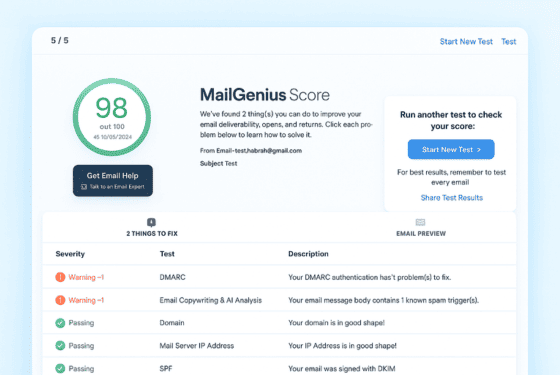

What Is TXT?
TXT records are DNS records that allow domain owners to store text-based information in their domain’s DNS. They’re commonly used for email authentication, domain verification, security policies, and other services that need to confirm domain ownership or configuration.
Instead of your domain being treated as an unknown sender, properly configured TXT records provide important information that receiving servers can use to verify and authenticate your domain. More importantly, they help establish that your email infrastructure is legitimate and that your domain is authorized to send messages.
TXT records are commonly used by email authentication standards like SPF, DKIM, DMARC & BIMI. Each protocol uses TXT records differently, with specific formats and DNS locations. Tools like a TXT checker make it easier to identify these records, verify their configuration, and detect potential issues before they affect your email deliverability.
Why TXT Records Matter
Inbox providers are increasingly cautious. With phishing & spoofing at an all-time high, simply sending emails that “deliver” isn’t enough. You need to prove your domain is authentic. TXT records help you do just that.
Why does it matter? Because email authentication depends heavily on accurate DNS configuration. When your TXT records are properly configured, inbox providers can verify your domain and confirm that your email infrastructure is authorized and trustworthy.
When your domain is properly authenticated, your emails have a stronger foundation for reliable delivery. TXT records bridge that gap by providing the DNS-based information required by protocols like SPF, DKIM, DMARC & BIMI.
Without properly configured TXT records, important authentication mechanisms may fail or become unreliable. With accurate TXT records, you give inbox providers the information they need to verify your domain, protect your sending reputation, and support more dependable email delivery.


Who TXT Records Are For
TXT records aren’t just for enterprise companies with complex email infrastructure. They’re for any business that relies on email authentication, domain verification, security, and reliable email delivery.
E-commerce brands use TXT records to authenticate their domains and help ensure customer emails are properly verified.
SaaS and B2B companies rely on TXT records for SPF, DKIM, DMARC, and domain verification across their email infrastructure.
Financial services and healthcare organizations use TXT records to support secure email authentication in industries where trust is paramount.
Startups and growth-stage businesses use TXT records to establish reliable DNS and email authentication as their teams, domains, and communication needs grow.
If you rely on email for sales, customer engagement, or transactional updates, properly configured TXT records are essential for maintaining secure, authenticated, and reliable email communication.
How MailGenius Delivers This Service
Managing TXT records requires more than simply adding a text value to your DNS. You need accurate record formatting, proper DNS configuration, correct authentication settings, and consistent monitoring to ensure everything works as intended.
MailGenius helps with TXT record setup & monitoring through our free email testing software designed for marketers, not just developers. Here’s how:
1. Comprehensive Checks
We check your domain’s SPF, DKIM, DMARC & BIMI records to ensure your email authentication is properly configured.
2. Record Verification
Our team verifies that your TXT records contain the correct values and follow the required specifications, so they can be properly recognized by DNS and email providers.
3. DNS Record Setup
We help verify the necessary TXT records in your domain’s DNS and identify missing or misconfigured entries.
4. TXT Checker Validation
Using our tools, we confirm that your TXT records are correctly configured and visible in DNS, helping ensure your domain is properly authenticated and verified.
5. Ongoing Monitoring
TXT records aren’t “set it and forget it.” MailGenius helps monitor your email authentication and DNS configuration to identify issues before they affect your email delivery.
Unlike generic diagnostics tools, MailGenius combines software with expert consulting. That means you not only see what’s wrong, you also get guidance and hands-on support to fix it.


Why Choose MailGenius for TXT Record Verification
Plenty of tools claim to help with TXT records, but MailGenius stands out because of its marketer-first approach. We translate the technical requirements of DNS and email authentication into plain language and actionable steps.
Our platform doesn’t just tell you “something’s broken.” It shows you exactly which TXT records need fixing, why they matter, and how to correct them. Plus, with our deliverability experts on call, you have someone who has solved DNS, authentication, and deliverability issues for hundreds of brands across e-commerce, SaaS, and enterprise organizations.
When you choose MailGenius, you’re not just implementing and checking your TXT records; you’re strengthening your entire deliverability strategy. You’ll gain the visibility and confidence you need to ensure every message reaches the inbox, carries your logo, and drives more opens & clicks.
Frequently Asked Questions About TXT records
TXT records are DNS records that allow domain owners to publish text-based information in their domain’s DNS. They’re commonly used for email authentication, domain verification, security policies, and other services. When properly configured, TXT records provide information that DNS resolvers and receiving servers can use to verify your domain and confirm that specific services or authentication protocols are authorized.
Yes, TXT records are commonly used by important email authentication protocols like SPF, DKIM, DMARC, and BIMI. Each protocol uses TXT records differently and may require them at a specific DNS location. Without the correct records, inbox providers may not be able to properly authenticate your domain or verify your email infrastructure. MailGenius helps you identify and validate these records.
TXT records help establish important information about your domain, including which servers are authorized to send email and how receiving systems should authenticate your messages. Properly configured records support domain verification, email security, and authentication. They can also help reduce authentication failures and provide a stronger foundation for reliable email delivery.
TXT records support many different purposes, but they’re especially important for email authentication and domain verification. Common examples include SPF records for authorizing sending servers, DKIM records for email signatures, DMARC records for authentication policies, and BIMI records for brand identification. Other services may also use TXT records to verify domain ownership or publish security-related information.
TXT records are added through your domain’s DNS provider, such as Cloudflare, GoDaddy, Namecheap, or your hosting provider. The exact DNS name and value depend on what the record is being used for. Some records are added at the root of your domain, while others use specific names such as _dmarc or a DKIM selector. Your DNS provider controls where and how these records are published.
Properly configured TXT records can support email deliverability by enabling authentication protocols such as SPF, DKIM, and DMARC. TXT records themselves don’t guarantee inbox placement, but accurate authentication helps receiving providers verify your domain and can reduce authentication-related delivery problems. They work best alongside healthy sending practices and a good sender reputation.
You can use a TXT checker to look up the records published for your domain and verify whether they contain the expected values. These tools can help identify missing records, incorrect values, formatting problems, and other DNS configuration issues. MailGenius can help you understand what each record means and what needs to be corrected.
Incorrect or missing TXT records can cause domain verification and email authentication to fail. For example, an improperly configured SPF, DKIM, or DMARC record may prevent receiving providers from correctly validating your messages. Conflicting or duplicate records can also create problems, which is why it’s important to check both the record value and where it is published.
Simply enter your domain into the MailGenius TXT checker to look up the TXT records currently published in your DNS. The checker can help you identify authentication records and review their configuration. If something is missing or incorrect, you can update the records through your DNS provider and then run the check again to confirm the changes are visible.
Run a free deliverability test with MailGenius or book a consultation. Use our TXT checker to validate your configuration, and take the first step toward a stronger inbox presence today.
Get started with MailGenius now and make sure your emails are seen, trusted, and acted on.